
MyINFINITI App
Nissan North America, Inc.Auto & Vehicles
4.7353.00 Reviews
- Version
- 3.12.110
- Installs
- 100.00K
- Age Rating
- Everyone
Screenshots
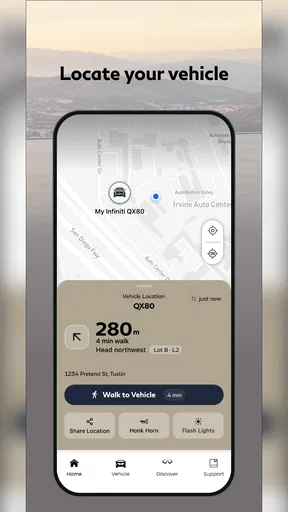
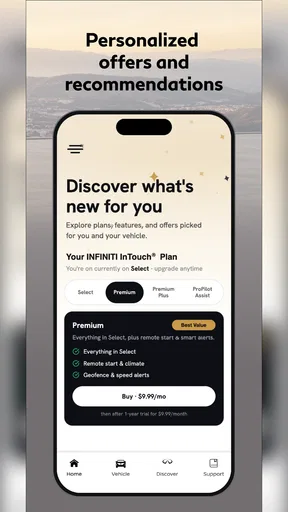
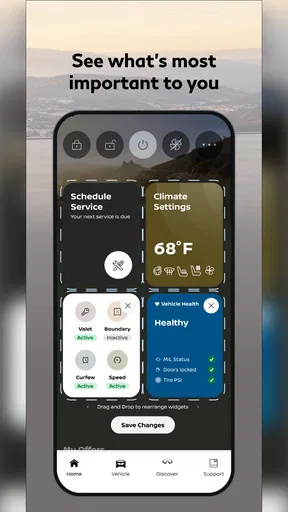
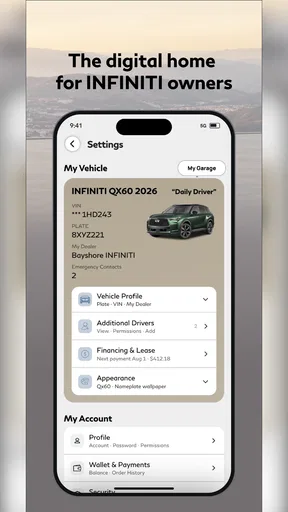
Our Review of MyINFINITI App
 Analysis by Appyee
When a vehicle is shared by several people, the hardest part is often not driving it but keeping everyone aligned. One person notices a warning, another handles a service visit, and someone else needs to remember where the vehicle was last used. MyINFINITI App is designed around that ownership experience for INFINITI drivers, and I found it most useful when treated as a practical companion to the vehicle rather than as a replacement for the car’s built-in controls.
It is a free Auto & Vehicles app from Nissan North America, Inc., with an Everyone content rating. The store identifies it as the INFINITI Owner App, which is a straightforward description of its purpose: it brings ownership-related information and actions into a mobile setting. The app has a 4.7 average from around 2.4 thousand ratings and has passed 100 thousand installs, so it has clearly attracted a meaningful audience of drivers.
My overall impression is positive, especially for an owner who wants a single place to stay connected with vehicle-related tasks. The real value appears when the app is used consistently by the person responsible for the car, or when a household agrees on who manages the account and how information is shared. That last point matters more than it may seem. A vehicle can be shared, but an account is not automatically a shared household system.
How MyINFINITI fits into a shared household
Imagine a normal weekday: one adult takes the INFINITI to work, another uses it for errands, and a younger family member may ride along or eventually drive it. During the day, someone notices that the vehicle needs attention, while the person who usually arranges maintenance is somewhere else. In that situation, a dedicated owner app can reduce the amount of passing messages and forgotten reminders.
I would use MyINFINITI as the household’s reference point for ownership matters. Instead of searching through old emails or relying on memory, the person responsible for the vehicle can check the app when planning a service visit or reviewing vehicle information. That creates a cleaner routine: the driver reports an issue, the account holder checks the relevant details, and the next action is decided from the same place.
The benefit is not simply convenience. Shared cars create small gaps in responsibility. One person assumes another has handled a task, or a warning is mentioned casually and then forgotten. An owner-focused app helps make those handoffs more deliberate. I especially like the idea of checking it before a longer trip, after a change in the vehicle’s condition, or when a service-related question comes up.
There is also a useful distinction between using the app for coordination and using it as a control center for every person in the household. I would not assume that installing it on several phones automatically creates a complete family dashboard. The sensible approach is to decide who owns the primary account, who needs access to information, and how updates will be communicated. That boundary prevents confusion when several people use one vehicle.
One account holder can keep the routine clear
For a household, the smoothest arrangement is usually one person taking responsibility for the account and the vehicle’s administrative side. That person can check the app regularly, keep track of upcoming tasks, and tell other drivers what they need to know. If another household member also uses the app, both people should agree on which actions belong to the main owner and which are simply checks for information.
This is a small but important workflow improvement. Without an agreed boundary, two people may both think the other has followed up, or one person may change something without telling the rest of the household. MyINFINITI is more useful when it supports a clear routine instead of becoming another disconnected app on everyone’s phone.
I would also avoid treating the app as a substitute for direct communication when a vehicle problem affects safety. If a driver reports an unusual sound, a warning, or a handling issue, the right response is to discuss it immediately and seek appropriate assistance. An app can help organize ownership information, but it should not encourage anyone to postpone a physical inspection or rely only on a phone screen.
Setup, account boundaries, and everyday coordination
Getting value from an owner app starts with setting it up around the correct vehicle and the correct account. I would take a few minutes to confirm that the account belongs to the person who genuinely manages the INFINITI. That sounds obvious, but shared-device households often change over time. A vehicle may move between partners, a phone may be replaced, or a family member may stop being the regular driver.
The practical lesson is to keep the account boundary intentional. Do not hand a phone to a child or occasional driver and assume that person should manage ownership information. Likewise, do not make a temporary driver the household’s permanent point of contact simply because they happened to install the app first. A little planning at setup makes later coordination much easier.
MyINFINITI is available at no cost, which lowers the barrier to trying it. The current version is 3.12.110, and it supports devices running Android 8.1 or later. Those details matter for older household phones. If one family member uses an older device, checking compatibility before planning a shared setup can avoid an unnecessary argument about why the app cannot be installed there.
I would still keep the app updated when updates are available. Vehicle-related apps depend on reliable communication between the phone, account, and service environment, so using an old installation can create avoidable friction. At the same time, I would not install it on every household device just to make the app feel more central. A smaller, well-defined setup is usually easier to manage.
A useful handoff routine
For a shared vehicle, I would use a simple three-step routine. The regular driver reports anything unusual as soon as possible. The account holder checks MyINFINITI when the issue concerns ownership, service, or vehicle information. The household then agrees on the next action and records it in whatever method everyone actually follows.
The third step is important because an app cannot solve a communication problem by itself. If one person checks the vehicle details but never tells the driver what happens next, the household is still working from incomplete information. MyINFINITI works best as the place where the responsible person verifies details, not as an excuse to leave other drivers guessing.
A second useful habit is checking before a planned journey rather than only reacting after something goes wrong. If the vehicle will be used for a weekend trip, I would review the app early enough to deal with any ownership or service task without rushing. That is a better use of the app than opening it only while standing in a crowded parking lot.
For people who keep paper records, receipts, or a separate calendar, the app does not necessarily need to replace those tools. I see it as the mobile layer of the ownership routine. A calendar may still be better for household scheduling, while the app is more relevant when checking INFINITI-specific information. Using each tool for what it does best avoids duplicating every detail in several places.
Where the app is more useful than ordinary alternatives
The usual alternative is a mixture of the vehicle manual, a dealership phone number, email searches, and memory. That approach can work, but it scatters information across places. MyINFINITI has an advantage because it is built specifically around the INFINITI ownership relationship rather than general driving advice.
A generic notes app can store a service reminder, but it does not provide the same vehicle-focused context. A general navigation app may help with a journey, but it is not intended to organize ownership tasks. The advantage here is specialization: when I open MyINFINITI, I expect the content to be relevant to the INFINITI rather than to driving in general.
That specialization also creates the main trade-off. If you rarely need ownership information, do not share the vehicle, and already have an efficient service routine, the app may feel unnecessary. A paper reminder and occasional direct contact may be enough. MyINFINITI makes more sense for owners who want a recurring digital connection to the vehicle, not for someone looking for a broad driving app.
I also would not compare it directly with a full navigation or roadside-assistance platform. Those tools may be better for route planning, traffic, or general travel support. This app’s role is narrower and more ownership-centered. Choosing it should come from wanting a dedicated INFINITI companion, not from expecting one application to replace every automotive tool.
Trust, age, and sensible access
The Everyone rating makes the app broadly suitable from an age-classification perspective, but that does not mean every household member should have the same responsibility inside it. Age rating and account trust are different questions. A child may be allowed to view or use an app on a family device, while the adult owner still keeps control of vehicle-related decisions and account details.
That distinction is especially important in a shared-device environment. I would not give a younger family member ownership duties simply because they are comfortable with smartphones. They can report what they notice, help locate information when an adult is present, or use the app as part of learning responsible vehicle habits. The adult should remain the person who decides what action follows.
For teenagers or occasional drivers, the most useful arrangement is clear communication before they take the vehicle. They should know whom to contact if a warning appears, if the vehicle behaves differently, or if a service issue comes up. MyINFINITI can support that conversation, but it does not replace it. Trust comes from agreed expectations, not from placing an app on another person’s phone.
I also think households should be careful with unlocked phones and shared tablets. An owner application may contain information that should not be casually explored by every visitor or temporary user. Even without inventing special family controls, the sensible practice is straightforward: use personal device security, avoid leaving an account open on a communal screen, and decide who genuinely needs access.
What I would expect from the app in real use
My expectations are practical rather than dramatic. I want the app to reduce the time spent searching for vehicle-related information, make ownership tasks easier to remember, and give the responsible driver a more direct connection to the INFINITI. When it does those things, it earns a place on the phone.
I would not expect it to eliminate every visit, call, or conversation. Some issues require a technician, some questions are easier to resolve directly, and some household decisions have nothing to do with the app. The strongest use case is the middle ground between the vehicle itself and the owner’s daily routine.
One non-obvious benefit is that it can help separate observation from action. A passenger may notice something, the regular driver may confirm it, and the account holder may arrange the next step. Keeping those roles distinct reduces the risk that a casual comment becomes a forgotten problem. That is a modest improvement, but it is exactly the kind of improvement that makes an ownership app worthwhile.
Another trade-off is that convenience depends on consistent participation. If only one person uses the app but everyone assumes it is a shared record, misunderstandings can still happen. I would tell a household to agree on a single sentence such as “the account holder checks the app, then confirms the decision.” That simple rule is more valuable than installing it on several phones without a plan.
A third insight is to treat the app as a checkpoint, not a notification substitute. I would build it into a weekly or pre-trip routine instead of waiting for a dramatic reminder. Regular, short checks are less stressful than trying to reconstruct the vehicle’s status after weeks of neglect. This is particularly helpful when the car rotates between several drivers.
My household verdict on MyINFINITI
After looking at it as an owner and as part of a shared household, I see MyINFINITI as a focused tool with a clear audience. It is best for INFINITI owners who want a dedicated mobile place for vehicle ownership information and who are willing to establish sensible account boundaries. It is also a good fit for households where one person coordinates service and other drivers need a reliable way to report issues and receive updates.
I would recommend it to a friend who has recently taken responsibility for an INFINITI, shares the vehicle with a partner, or tends to lose track of service-related details among messages and paperwork. The free price makes trying it easy, and the high average rating suggests that many users find the ownership experience worthwhile. Its broad age classification also means it can sit comfortably on a family device, provided the adult owner remains thoughtful about access and responsibility.
I would skip it if you want a universal driving app, a replacement for navigation, or a complete family-management system. It is not the right choice for someone who does not own or regularly manage an INFINITI, and it will not fix a household that has no agreement about who handles vehicle decisions. In those cases, a general notes app, calendar, navigation tool, or direct service contact may be more appropriate.
The app’s limitations are mostly about scope and expectations. It cannot turn every driver into an informed owner, and it should not be treated as the only source of safety advice. It also works best when the account is maintained by the right person and when household members communicate outside the app. Those are not reasons to dismiss it; they are the conditions that make its focused design useful.
My final view is that MyINFINITI earns its place when it becomes part of a small, repeatable ownership routine: the right person manages the account, drivers report concerns promptly, and the household uses the app to coordinate rather than to avoid conversation. For that audience, it is a sensible and approachable companion for an INFINITI. For everyone else, its narrow focus is exactly why another automotive app may serve them better.
Released on July 27, 2022, and still maintained in version 3.12.110, it feels like a practical option for owners who prefer handling vehicle-related details from a phone. I would install it, set clear boundaries from the beginning, and judge it by one question: does it make my household more organized about the INFINITI? If the answer is yes, the app is doing its job.
Verdict
Strengths of MyINFINITI App
- Quickly schedule service appointments from your smartphone.
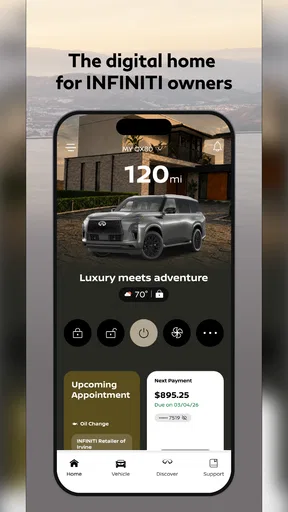
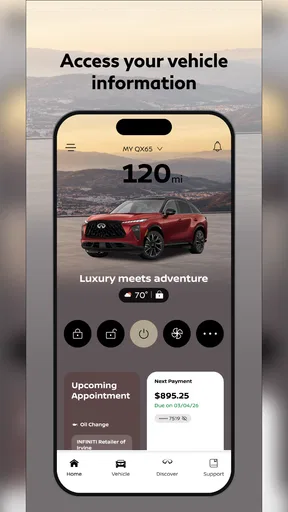
- Access vehicle information and maintenance details in one place.
- Roadside assistance can be requested without searching for phone numbers.
- Dealer contact options make it easier to communicate with support.
- Useful ownership tools reduce the need for paperwork and phone calls.
Limitations of MyINFINITI App
- Features may vary depending on your vehicle, dealer, and region.
- Requires an eligible INFINITI vehicle and account registration.
- Some functions depend on mobile data, GPS, or a stable internet connection.
- Remote features may not be available on older models or all trims.
- Users may need to reauthenticate after updates or account changes.
Other Releases by Nissan North America, Inc.
View All
MyNISSAN®
Auto & Vehicles4.6
Similar Picks in This Category
View All
Android Auto
Google LLC4.1

maxim — order a taxi & food
PT. SITO4.7

Штрафы ГИБДД: проверка с фото
Pays LLC – Штрафы ГИБДД4.7

Номерограм – проверка авто
Авто Ассист4.8

Дром Авто
Дром4.9

Frequently Asked Questions
What is the MyINFINITI App used for?
The MyINFINITI App is designed to help INFINITI owners manage and stay connected with their vehicle from a smartphone. Depending on the model, year, equipment, and market, it may provide vehicle information, maintenance reminders, service scheduling, roadside assistance, owner resources, and connected features such as remote commands. Available functions can vary considerably, so users should confirm compatibility before downloading.
Which INFINITI vehicles are compatible with the app?
Compatibility depends on the vehicle’s model, model year, trim level, installed connected-services hardware, and the country where it was purchased. Not every INFINITI vehicle supports every feature, and some functions may require an active connected-services subscription or trial period. After installing the app, owners generally need to register or link their vehicle using account and vehicle details to see which services are available.
Can I remotely start, lock, or locate my INFINITI using MyINFINITI?
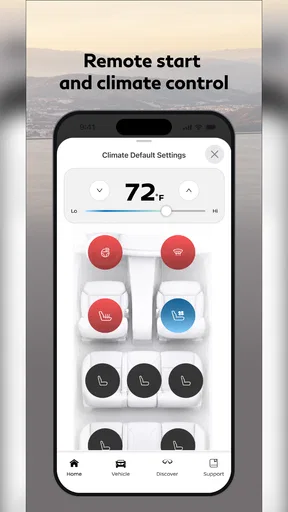
Some compatible INFINITI vehicles may support remote features such as starting the engine, locking or unlocking doors, locating the vehicle, or checking selected vehicle information. These options are not guaranteed for every model and may depend on the vehicle’s equipment, network coverage, account status, and an active service plan. Remote commands can also take time to complete and should be used responsibly.
Is the MyINFINITI App free to download and use?
The application itself may be available to download without an upfront charge, but certain connected-vehicle features can require a subscription, an included trial, or an eligible INFINITI owner account. Costs and plan terms differ by region and vehicle. Standard mobile data charges may also apply. Before relying on premium functions, review the current pricing and service conditions shown in the app or on INFINITI’s official website.
What should I do if MyINFINITI does not connect or remote features do not work?
First, check that your phone has a stable internet connection, the app is updated, and you are signed in with the correct INFINITI account. Confirm that the vehicle is compatible, has adequate cellular coverage, and is located where the service is supported. Restarting the app or vehicle may help, but persistent problems should be reported through the app’s support tools or an authorized INFINITI dealer.
